Windows desktop app · Free

Discord, but built for Roblox.

Lobby sits alongside Roblox and gives you what Roblox doesn't: friends with live presence, real messaging, guilds and forums, the full catalog with a proper item view, and tools for tuning and running the client.

  • Not a mod
  • Not an exploit
  • Not a script executor
  • No in-game advantage

Windows 10 and 11 · v0.15.45 · 104.7 MB

Not affiliated with, endorsed or sponsored by Roblox Corporation.

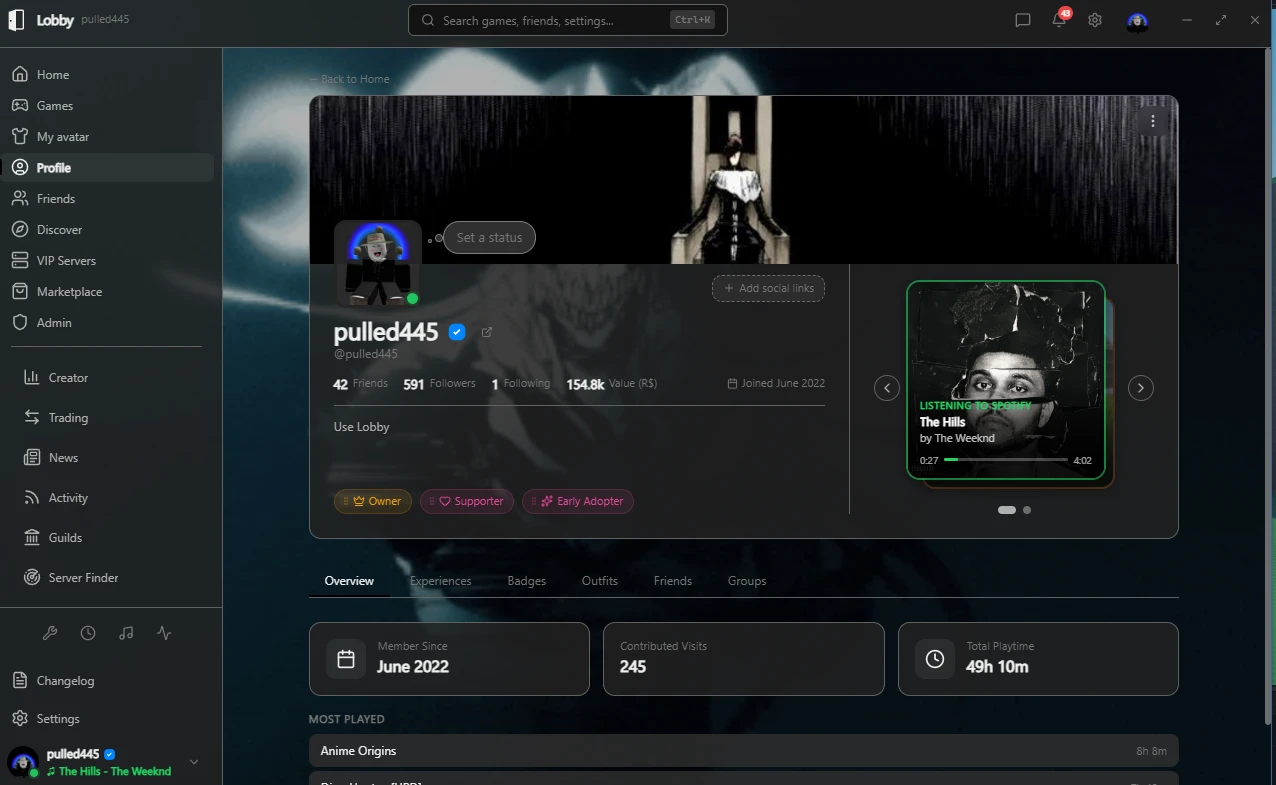
Lobby's Profile page: a Roblox profile with banner, avatar, friend and follower counts, badges, a now-playing Spotify card, and tabs for experiences, badges, outfits, friends and groups.

What the Lobby Roblox app does

All of it shipped and free, except the things marked Lobby Plus or Lobby Pro

About the paid tiers. A few features are reserved for Lobby Plus or Lobby Pro - two tiers that do not exist yet. Billing hasn't been built, so nobody can buy either and those features are locked for everyone, including us. They're marked wherever they appear so you know before you download. Everything else works today.

Social

A friends layer Roblox never gave you

  • Friends list with live presence - see who's online, what game they're in, and join them
  • Track specific friends and get notified when they come online or start playing
  • Direct messages, group chats and guild chats, delivered instantly
  • Guilds - create one, invite people, assign roles, transfer ownership
  • Forums - real boards, threads and replies, inside the app
  • Custom status - an emoji and a line of text everyone sees on your profile, with an optional auto-clear timer
  • Profiles with badges and a custom statusCustom picture & banner: Lobby Plus
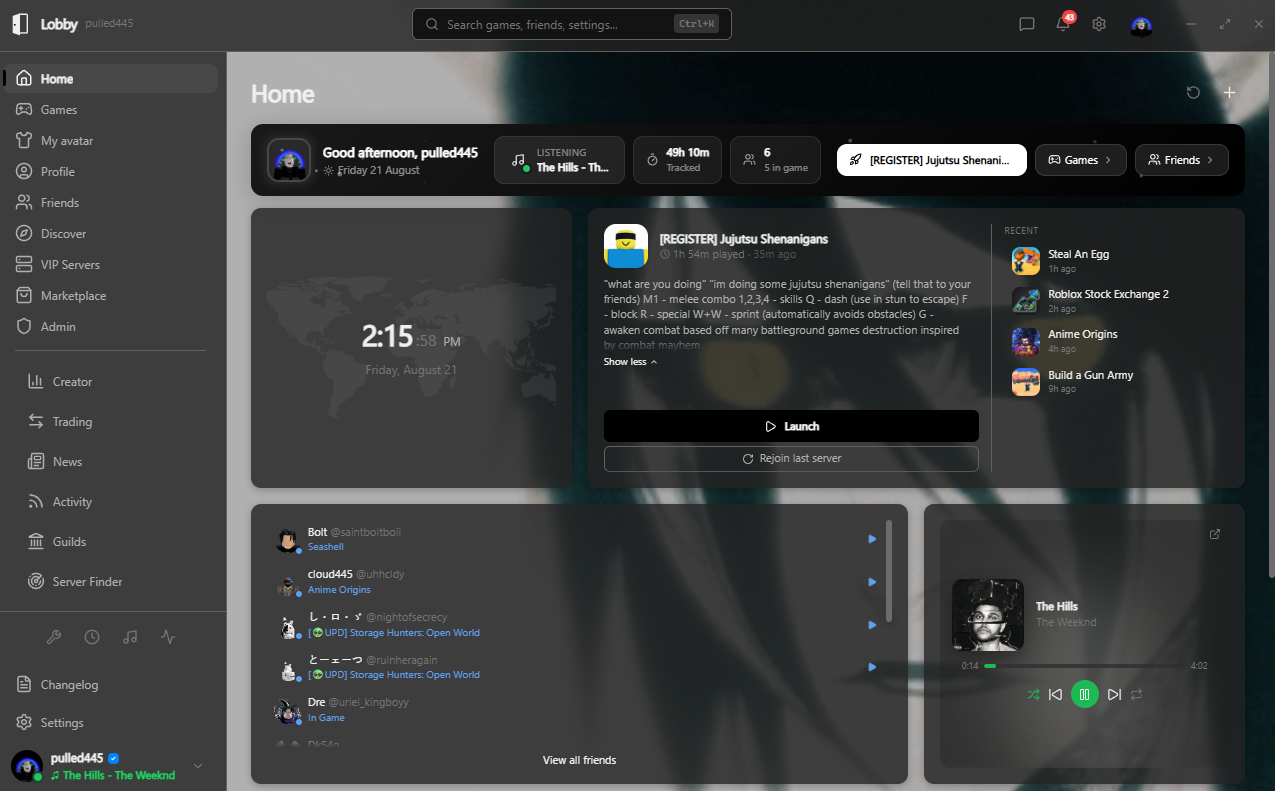
Lobby's home screen: the game you last played with a Launch button, a list of recent games, a friends list showing who is online and what they are playing, and a now-playing music panel.
The home screen, with the friends list showing live presence.

Roblox tools

Tune the client, keep an eye on a long session

  • FFlag, font and graphics tools for tuning the Roblox client
  • Private server management with folders and favourites
  • Multiple Roblox accounts, each with its own settings, and multi-instance launching if you need more than one client open
  • Macro monitor - posts a screenshot of your Roblox window to a Discord channel on a timer, so you can check a long session from your phone. It captures only the Roblox windows - never your whole screen, never any other window
  • Game ratings - rate any game out of 5 and see what other Lobby users gave it
  • Server Finder - search every place in a game to find a specific player, then join the exact server they're in Lobby Pro - coming soon

Marketplace & trading

The catalog, the resale market, and your trades

  • Browse and search the full Roblox catalog with proper filters for every accessory slot
  • Item view - big preview, creator link, and whether you already own it
  • For a limited, the live resale market: who's selling, at what price, which serial number, and how the value has moved
  • Trading with an inventory browser and a value calculator
  • Deal sniper and trade alerts - watches for underpriced items Lobby Pro - coming soon

Everything else

Your dashboard, your playtime, your theme

  • Weekly recap - what you played this week, plus all-time totals
  • Spotify integration - now playing on your profile, with playback controls and what's up next
  • A customisable dashboard with widgets
  • Themes, accent colours, custom fonts and backgrounds - and a light theme as well as dark
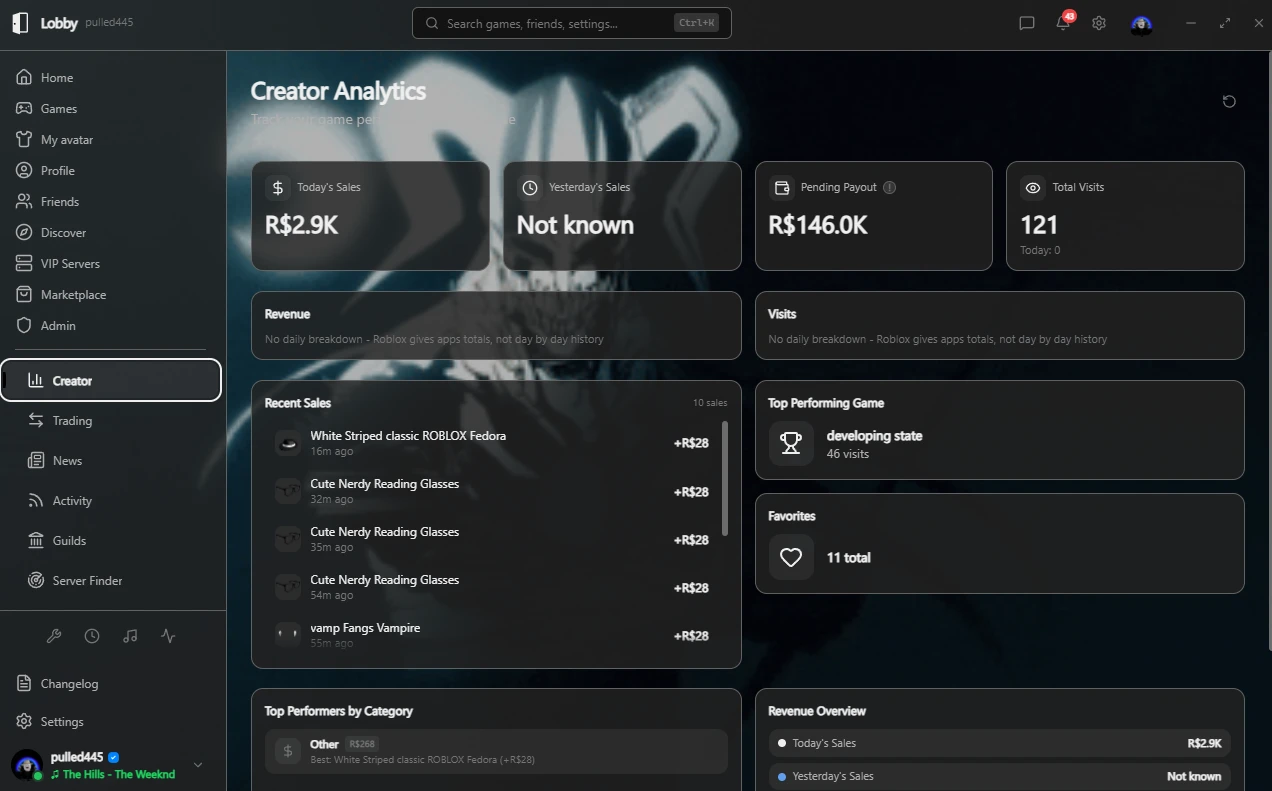
Lobby's Creator page: today's sales, pending payout and total visits, a list of recent item sales with amounts, the top performing game, and a revenue breakdown.
The Creator page. Yesterday's Sales reads Not known because Roblox gives apps totals rather than day-by-day history, and a zero there would be a number nobody measured.

What people say

  • isthereanother

    @isthereanother

    4 out of 5

    I've been testing since before release. There have been bugs and half-finished bits, but every one I reported got fixed within the hour, which honestly surprised me every time. I run a few groups doing UGC and clothing, so the Creator page is the one I actually live in - seeing sales across all of them together beats checking each group on Roblox. It's Bloxstrap and an account manager and the rest of it in one window, and you can set the pages up around what you actually do. Four stars until it's finished and properly out.

    UGC and clothing groups
  • y5v9

    @y5v9

    5 out of 5

    I do a lot of AFK farming, so I've usually got a stack of accounts running at once. Launching all of them straight into my own VIP server, with my FastFlag setup already applied, is the part I could never get working properly before. The graphics and FPS handling stops it from killing my PC, and the performance monitor tells me when a server starts lagging so I know when to pull my alts back in. The Spotify page is a nice extra, feels a bit like Discord. And the activity tracker giving me a recap of what I've been playing and listening to is oddly fun to look at.

    Runs multiple accounts

Questions

Is it safe?

Lobby is a normal Windows desktop application built with Electron. It doesn't inject into, modify or read the memory of the Roblox client, and it doesn't run scripts inside your games. It talks to Roblox's own public web endpoints and to its own backend.

Download it only from this site - the button above is the same installer the app's own updater pulls from - so you know what you're installing.

Is it against Roblox's rules?

Lobby is a companion app, not a cheat, exploit, mod or script executor. It gives you no in-game advantage and does not alter gameplay. It is an independent project and is not affiliated with, endorsed or sponsored by Roblox Corporation. You are responsible for how you use it, and Roblox's Terms of Use always apply to your account.

Does it need my Roblox password?

Your credentials stay between you and Roblox. There are two ways to sign in, and they are not equivalent - pick knowing the difference:

  • Roblox OAuth. You approve Lobby on Roblox's own page and Lobby never sees a credential of any kind. This is read-mostly: it cannot send messages or see your balances, so some of Lobby won't work.
  • Full sign-in. Roblox's own login page opens in a window inside Lobby and the resulting session is stored, encrypted, on your own PC. Lobby doesn't handle your password - Roblox's page does.

Either way that session never leaves your machine: it isn't uploaded, isn't logged, and is never included in any export.

How is it different from Bloxstrap or Froststrap?

Those are launchers - they start Roblox with your settings applied. Lobby does that too, with FastFlag, font and graphics tools, but it is mainly the layer around the game: a friends list with live presence, chat and guilds, the marketplace with resale history, trading, and a server finder that searches every place in a game for a player.

If you currently run a launcher, an account manager and Discord side by side, Lobby is those in one window.

Is it free?

Free to download and free to use. A few features are reserved for one of two paid tiers: custom profile picture and banner needs Lobby Plus, and the Server Finder and deal sniper / trade alerts need Lobby Pro.

Neither tier is available yet. Billing hasn't been built, so neither can be bought and those features are locked for everyone. If one of them is the reason you're here, wait for it rather than downloading today. Everything else on this page works right now, for free.

What does it work on?

Windows 10 and 11 (64-bit). There is no macOS, Linux, Android or iOS build, and Lobby does not run on a phone or on a Chromebook. If you're reading this on your phone, send yourself the link and install it on your PC.

Something is broken. Where do I report it?

Email Lobby support. It goes to the person who builds Lobby, so there is no ticket queue in front of you.

The app can write the email for you, with your version and system details already filled in: Settings > About > Report a problem. That saves the two questions that otherwise come back first.

If you can, attach your log file - it answers most questions on its own, and Lobby will find it for you: Settings > General > Your log file > Open folder.

Get Lobby

Free, for Windows 10 and 11. There is no Mac, Linux or mobile version.

Download for Windows

Version v0.15.45 · Size 104.7 MB